Guide / Tutorial Using Google Adwords
As you all already know, the number one place to do a search on the internet is ... Google. Nothing beats Google as the search engine one of the most accurate numbers. If there is a question as to whether Google's? everybody would say, where to find the solution number 1 on the internet. As an internet marketer, our answer is slightly different.
Is Google it?
Google is looking for a potential buyer number 1 on the internet. It's a fact that has been proven .. With Google, you can make your website appear when someone types a word in the box searchnya. What is typed in the search box referred to as keywords. You will only pay Google when your ad is clicked. Therefore, the way to advertise is called PPC (Pay Per Click), aka pay for each click. Well, how to use Google as an advertising medium? Here is langkah2nya
To be able to advertise on Google, you have to register on Google Adwords. If you have a list, the list here => list of Google Adwords
Sign in Adwords free, but to use it you have to perform activation with a credit card for $ 5. Mandatory use of credit cards. Well, once you sign up, go to your Google AdWords account and go to the menu campaign summary Just a note, for the first time register, will automatically directly told to make campaign. Well langkah2nya sequence might be a little bit different. My guide is for an already active (as I've already activated). But it still helps the explanation anyway, just in a slightly different order bit.
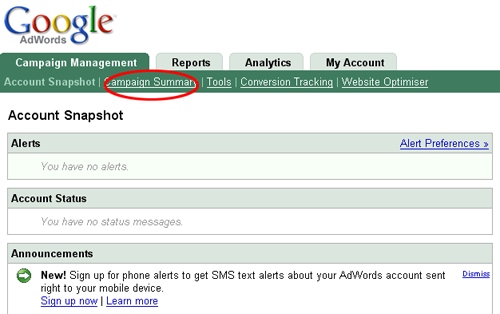
If so, click the link next to the posts targeted keywords create new campaign:
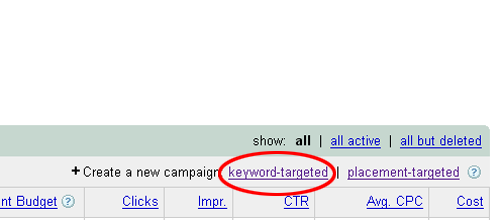
Targeted keywords will trigger your ads based on the keywords you want, while the placement-targeted ads will bring you to the website you want. To guide this time, we will try to keyword-targeted. After clicking the link keyword-targeted, you will go to the settings page of your first ad
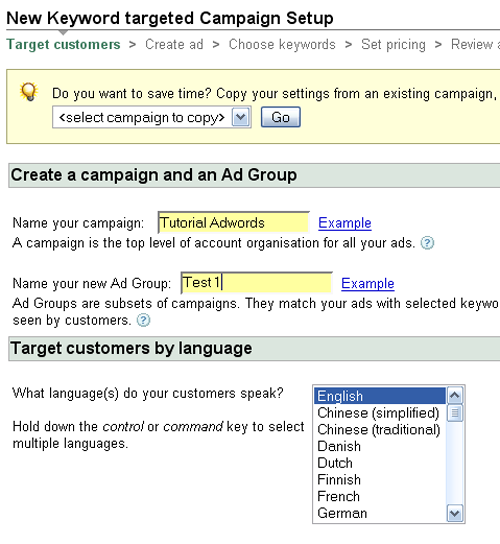
Write the name of your campaign your campaign on the column name (give it a name that clearly distinguishes the campaign to another, such as the name of the advertised website). In the Name your ad group, enter the keyword to set the keywords that you want to include later. For example, a collection of keywords containing the word chocolate milk, you name the group, chocolate milk. Get used to classify your adgroup for each main keyword to be easily analyzed later.
To use language that your customers, choose the language used by your target market. Generally it is English (this time, most people who like beli2 stuff online that of the United States - Indonesia most people still like clack click advertising if curious, but rarely buy, right?
The following page is to select the target location on your ad
To use language that your customers, choose the language used by your target market. Generally it is English (this time, most people who like beli2 stuff online that of the United States - Indonesia most people still like clack click advertising if curious, but rarely buy, right?
The following page is to select the target location on your ad
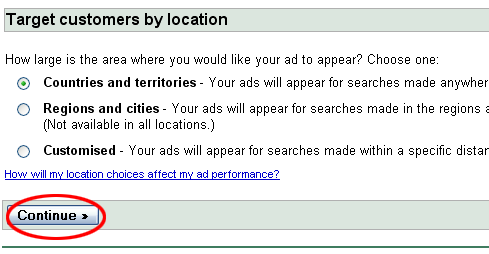
Pick a country and territories to put an ad on a particular country. Region and city to put an ad on a specific city, and customized to define more specific areas such as your specific coordinates of the satellite (wow..).
Then click continue
Then click continue
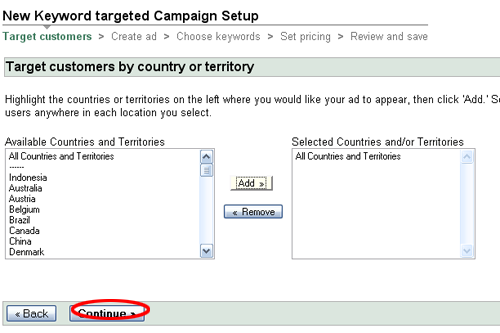
Next is to choose the country you want your ads to appear. Generally does the U.S. alone. But I recently discovered a new trick to know what the most common search for a particular keyword. Go to this website to find out http://Google.com/trends
Well, after determining the location of the country that you seek (I still stick to the U.S., rata2 people who like shopping using credit cards there), click on the continue button.
Well, after determining the location of the country that you seek (I still stick to the U.S., rata2 people who like shopping using credit cards there), click on the continue button.
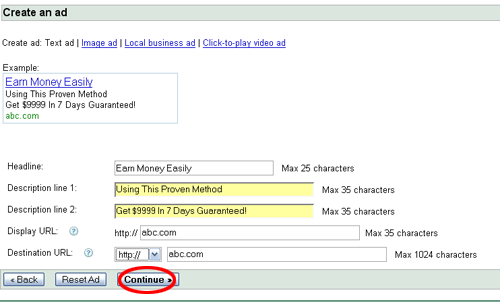
Enter the text of your ad here. Here is tips2nya:
Write the sentence that makes people curious
Write the sentence that controversial
Give sentence questions if necessary
Write down your keywords in your ad copy. When your ad appears next will be bold and stand out compared to other ads
Next is the selection of keywords
Write the sentence that makes people curious
Write the sentence that controversial
Give sentence questions if necessary
Write down your keywords in your ad copy. When your ad appears next will be bold and stand out compared to other ads
Next is the selection of keywords
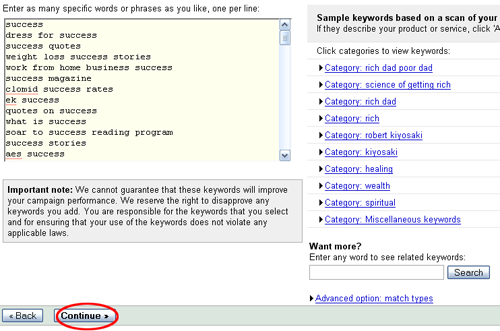
Well, enter the keywords you want here. Later when people type in these keywords, your ad appears warranted. Tips from me is do not put a lot of keywords to thousands / hundreds. Google has a system like this, if they believe in quality and often your ad is clicked people, then the cost-per-click you can bargain with itself. Now, where did I see that your ad is qualified or not? Then with a slight impression many clicked on your ad, your ad means good. Well, if you are thousands of keywords, it is definitely the number of his clicks and keywords that you seek are not comparable. Bisa2 impression that clicking just millions but tens. So the quality of your ads can be ugly and the price so high.
Tips from me is, do not use just a feeling you to select keywords. Sometimes we feel the feeling is much sought after keywords, but the reality is not necessarily like that. Enter a keyword only freekeywords.wordtracker.com. It will suffice for keywords that appear there are a lot of people must be sought. However, not everything is good quality too. There will be a trick to find the berkualitasnya.
If so, click continue ..
Tips from me is, do not use just a feeling you to select keywords. Sometimes we feel the feeling is much sought after keywords, but the reality is not necessarily like that. Enter a keyword only freekeywords.wordtracker.com. It will suffice for keywords that appear there are a lot of people must be sought. However, not everything is good quality too. There will be a trick to find the berkualitasnya.
If so, click continue ..
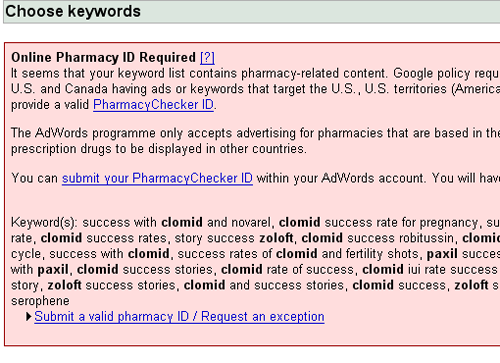
Well, this picture appears if your keyword contains certain words that needed the approval of the law in the United States. Do not be concerned, just click next again After that, your ad creation process is complete, it will display like this
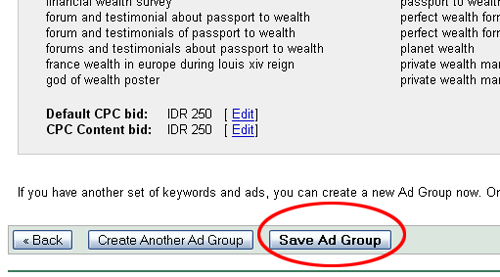
Click Save Ad Group and be done.
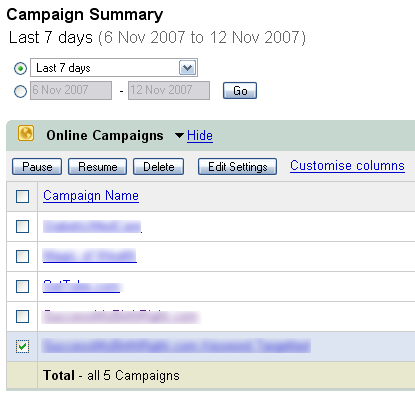
There is still a configuration that can be set, you just select the campaign (advertising) and click edit settings
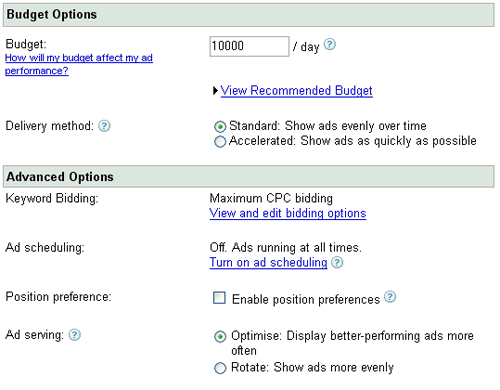
This is your campaign setup screen. In the budget, you can determine your budget per day. Thus, if the amount of fees to be paid exceeds $ 10,000, then your ad will not appear again. This is very important. Management of advertising costs should be the focus of your attention. Do not wait until you are debt-ridden and bankrupt the same Google instantly!
Keyword bidding only to determine the standard price of your keywords.
Ad Scheduling to specify what time you want to display your ads. So for example you think your market is only active at night, then your ad tampilkanlah only at night only.
Well, there is an option to enable position preference. This one should be clickable, meaning that we can determine our ad appears in position keberapa. This is a trick that is very telling. Make sure your ads only appear on the first page, but it does not have to appear.
Ad Serving, as described in his writings. I never ubah2 this one. Ads appearing regularly at any time will be more effective than ads that appear. Imagine if the same tv advertising appearing berkali2 and consecutive day, the audience definitely upset.
Keyword bidding only to determine the standard price of your keywords.
Ad Scheduling to specify what time you want to display your ads. So for example you think your market is only active at night, then your ad tampilkanlah only at night only.
Well, there is an option to enable position preference. This one should be clickable, meaning that we can determine our ad appears in position keberapa. This is a trick that is very telling. Make sure your ads only appear on the first page, but it does not have to appear.
Ad Serving, as described in his writings. I never ubah2 this one. Ads appearing regularly at any time will be more effective than ads that appear. Imagine if the same tv advertising appearing berkali2 and consecutive day, the audience definitely upset.
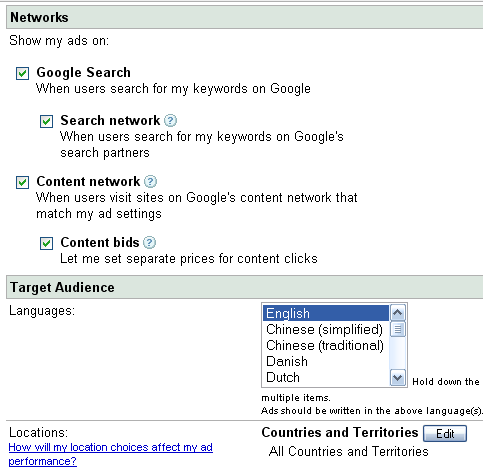
Well, this is to choose where your ads appear
Google Search means your ads will only show up when people do a search
Search Network means that your ads appear on Google's other partners, such as Ask Jeeves (Search engine etc.)
Content Network it means your ad will appear on adsense another person / other people pages
Content Bids means you can set different prices for advertising on the content network.
Tips from me is, you have to choose according to your needs. When you type a website to sell, then you need a buyer, not just immigrants. So show your ads only on the search network. So people who go to your website only orang2 seek solutions of the problem.
But if your website contains a variety of information and you want a lot of people who just want to come including lihat2, then place your ad on the content network. Because the people who click on ads on other people's websites is iseng2 people interested in your ad copy. Please note, if you plug in the content network, can impressionnya lot. It is suitable for adsense type website (it took a lot of visitors who like iseng2 click).
Well, my other tricks are quite telling is to determine the position of your ad to be displayed.
This trick only applies if you check the enable position preference writings Go into your campaign, then go to the ad group you want. Choose keywords tab to display all your keywords
Google Search means your ads will only show up when people do a search
Search Network means that your ads appear on Google's other partners, such as Ask Jeeves (Search engine etc.)
Content Network it means your ad will appear on adsense another person / other people pages
Content Bids means you can set different prices for advertising on the content network.
Tips from me is, you have to choose according to your needs. When you type a website to sell, then you need a buyer, not just immigrants. So show your ads only on the search network. So people who go to your website only orang2 seek solutions of the problem.
But if your website contains a variety of information and you want a lot of people who just want to come including lihat2, then place your ad on the content network. Because the people who click on ads on other people's websites is iseng2 people interested in your ad copy. Please note, if you plug in the content network, can impressionnya lot. It is suitable for adsense type website (it took a lot of visitors who like iseng2 click).
Well, my other tricks are quite telling is to determine the position of your ad to be displayed.
This trick only applies if you check the enable position preference writings Go into your campaign, then go to the ad group you want. Choose keywords tab to display all your keywords
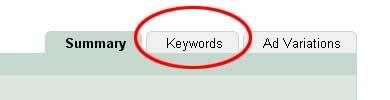
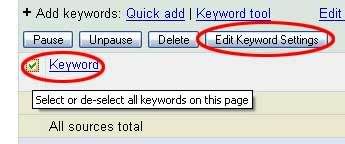
Check the boxes for all of your keywords, keywords and select edit settings
Well, if you have activated enable preferece position, there will be parts of Position Preference. Specify only 1 to 8, because the first page only contains 8 ads. Then click the small box next to the picture to apply for this rule to all keywords. If so click save changes.
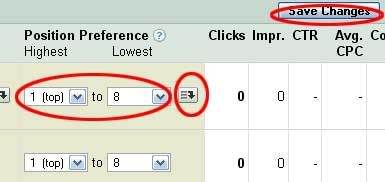
Thus, your ad will only be shown on the first page. If it does not appear on the first page, do not be performing as well. If you want to seriously invest in benar2 adwords advertising this, you should use software to help find the most appropriate keywords for your website. One of the best software that I recommend is Keyword Elite If you want to learn the theory, AdwordsInDetail guide created by Robert Hanson was very helpful. Currently, he frequently speaks at seminars internet marketing and became the right hand of Adam Khoo for internet marketing business in Indonesia.
Hopefully this tutorial can be useful information for you all. Keep learning and never give up!
Hopefully this tutorial can be useful information for you all. Keep learning and never give up!